Two handpans that become one: your 2 handpans
When a second handpan joins the first, Handpan Constellation Studio draws each chord across both — and tells you what that duo really unlocks.
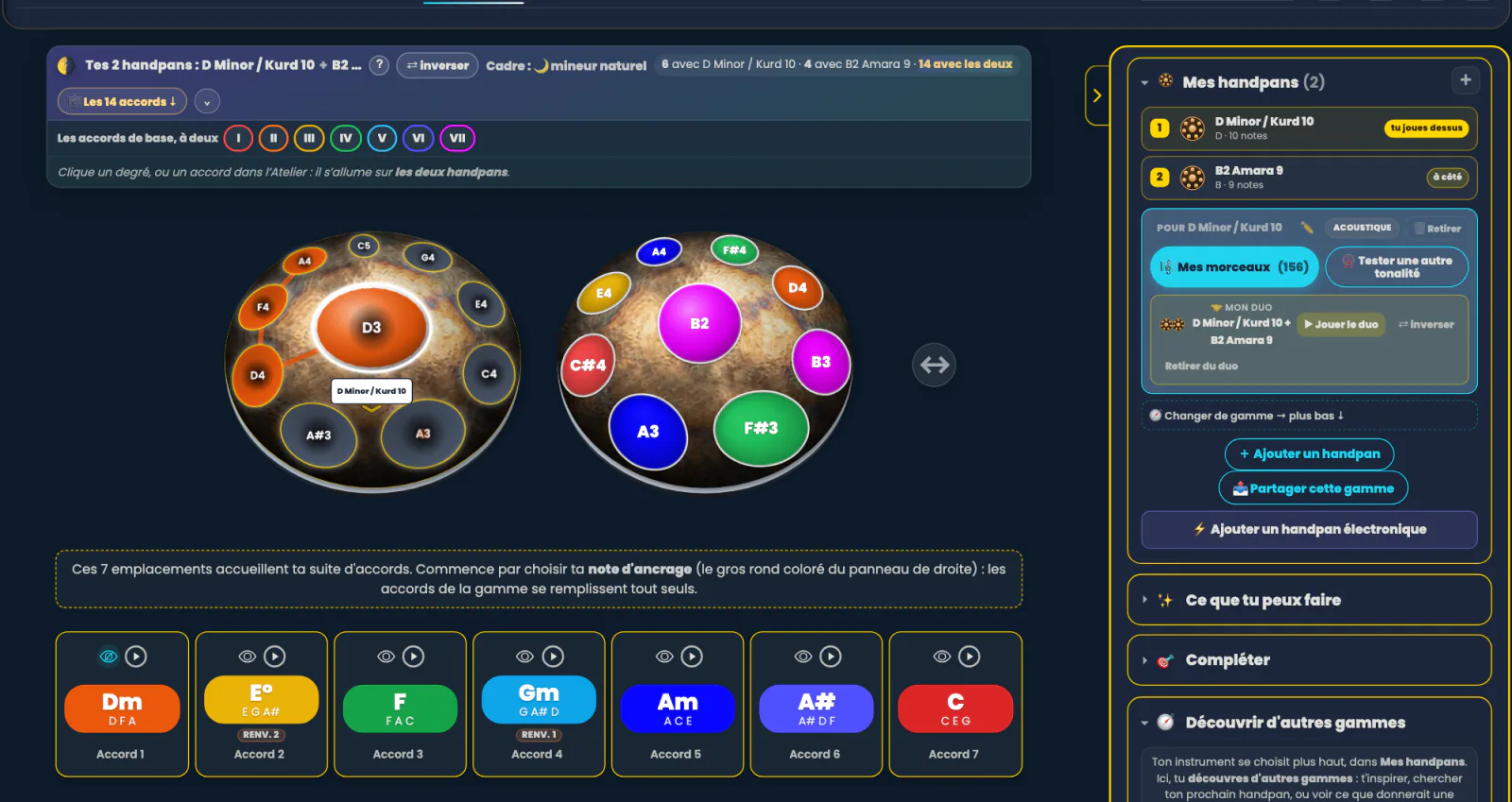
Many players end up owning two handpans — and playing them as two separate instruments. Those two instruments can be acoustic, electronic, or one of each. Handpan Constellation Studio looks at them differently: it lays both shells side by side and draws each chord across the two of them, with the play order and the hands. They’re no longer two pans. They’re one instrument.
There’s always a note missing
A handpan scale is a choice, and therefore a renunciation. You have nine or ten notes, beautiful ones, and there will always be that one missing note that would make the chord you dream of playable. It’s the most common frustration, and the most poorly explained: you think you can’t do it, when the note simply doesn’t exist under your hands.
The “Complete your scale” funnel (Compléter ta gamme) answers that honestly. It compares your instrument’s real notes — octaves included — with what the chords require, and shows you, chord by chord, which notes are missing.
What a second pan unlocks, in plain words
The real progress isn’t the list of missing notes: it’s the translation into music. Each suggestion now tells you how many pieces it makes playable, and which ones. Hallelujah, Let It Be, No Woman No Cry… rather than abstract degrees.
The app also points out what you already have without knowing it: the relative scale, often playable as-is on your pan, which it would be a shame to overlook before having anything made.
One word of honesty: those counters rest on a still-modest catalogue of scores. They tell the truth, but not yet the whole truth — the repertoire will grow as scores are added to the music library.
🌗 Two checkboxes, and the banner appears
Setting a second handpan down now takes two checkboxes. Right-hand panel, My handpans block: tick one instrument and it plays alone; tick a second and the pair is set — badges ⓵ and ⓶, in the order you ticked. The old “2nd pan” dropdowns (the guided strip, the “Complete” funnel) were removed at the end of August: one gesture is left, 🤝 Put alongside, and it accepts every one of your instruments, Neotone and custom shells included.
A banner then appears above your pans: 🌗 Your 2 handpans: the first + the second, with a ⇄ swap to exchange their places, the current tonal frame, and the count that says everything in one line:
- how many chords the first pan plays alone;
- how many the second plays alone;
- how many you have with both.
That last number is the real subject. For those chords, the voicing is genuinely computed across the two instruments — lowest root in the bass — and the path crosses the gap from one pan to the other. You see at a glance which hand goes where, and the play order follows.
A word on vocabulary, because the app now draws the line: two acoustics side by side is a duo. An acoustic and a Neotone is the other family — same banner, different rules; that is the subject of completing your acoustic handpan with a Neotone. The app never mixes the two families by default: it offers you the mixed pair instead of refusing.
Click the image to open it, then click again for full size.
Your repertoire, right from loading
Another quiet but decisive change: you no longer have to ask. As soon as a scale is loaded in acoustic Logic Mode, a line appears under the 7 degrees: ”🎵 N pieces playable with your scale”, with a “see →” that opens the list. The information arrives before the question. And which note would unlock the most is answered by “Complete” and by the ✨ Reveal screen.
And if you want to hear before deciding
Two details are worth their weight in gold before ordering anything:
- The key wheel (roue de tonalité) lets you listen to your scale transposed into another key. You hear the future instrument before it exists.
- The 440 / 432 Hz tuning setting tunes the app to your handpan, so what you hear on screen sounds right with what you hold in your hands.
Acoustic mode, “Complete” and the key wheel are free; permanently registering your two-handpan setup is part of the Studio version. And if the second pan becomes a real desire, the app tells you exactly which notes to ask for; those notes work for an acoustic instrument just as well as for a Neotone.
Open Handpan Constellation Studio, load your scale and see what you’re really missing. It’s often less than you think. And to explore all this together, my handpan lessons are open.
Ready to make your colours sing?
Try the app for free, or discover the electronic Neotone handpan.