Loop your chords, and sing over them
The accompaniment bar loops one chord — or a whole progression — at the tempo you choose. And when you want more, a drummer joins in.
In Handpan Constellation Studio, an accompaniment bar (barre d’accompagnement) lets you loop a chord — or a whole chord sequence — at the tempo you choose. The app plays, you sing. You don’t need to be able to play the chord to put your voice on top of it: in fact, the other way round works better.
Everything that follows holds whether your handpan is acoustic or electronic: the accompaniment bar and the drummer exist on both sides, on the acoustic mode’s chord grid as well as the Logic Mode one.
The block: singing needs two free hands
To sing over a chord, the chord has to keep turning — steadily, for a while, without stopping. Early on, though, looping a chord already takes all your attention: you’re counting notes, hunting for your hand, stopping to think. There’s no room left for your voice.
Hence a strange situation: people wait until they can play before they dare sing. And since singing is precisely what teaches you to feel a chord, they give up the most effective tool they have.
The app plays, you sing
The accompaniment bar flips the order. Click a chord in the grid and it starts looping. You set:
- The figure — block chord, arpeggio ↑, arpeggio ↓, arpeggio ↑↓ or arpeggio ↑×2;
- The rate — ♩ quarter, ♪ eighth, ♬ sixteenth;
- The tempo, in BPM, as slow as you need.
And if you click several chords, they fill a queue — one chord per bar — played on a loop. Your song’s chord chart turns on its own while you look for your melody, your vowel, your pitch. It’s exactly the exercise described in Transposing to sing, but with the instrument doing the work for you.
That bar exists both on the acoustic mode’s chord grid and on the Logic Mode one, and it’s part of the free version. An acoustic handpan benefits exactly as an electronic one does: the app is what keeps the chord turning, your instrument stays what it is.
Then a real drummer walks in
Once the loop is running, something is still missing: a living pulse. A metronome tells the time; a drummer makes you want to play.
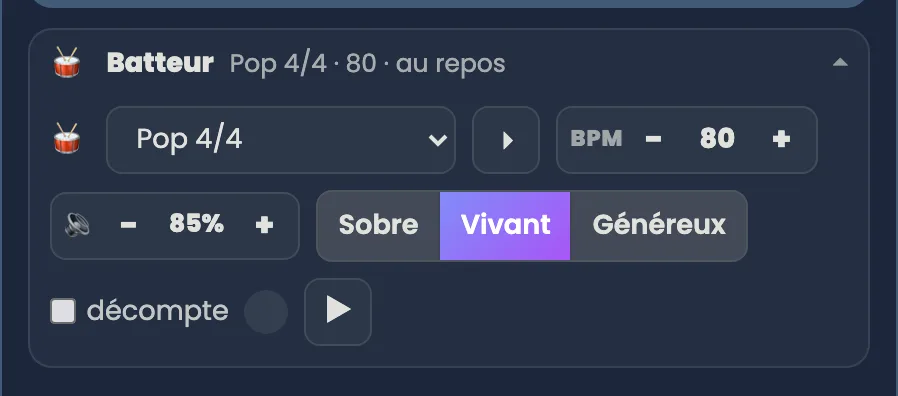
He’s right there, next to the bar: a 🥁 Drummer drawer. Open it, pick a groove, a tempo, and a “life” — Plain, Alive, Generous. 41 grooves in eight families: For the handpan (Breath, Heartbeat, Soft cajón, Waves, Lullaby, Easy walk, Rain, and the plain metronome), Pop & Rock, Latin, Africa & the East, Swing & Jazz, Hip-hop & Urban, Electronic & Dance, From around the world. Each one has its fills.
This too is free, and it needs no hardware: the drummer runs in the browser, right from the Discovery level, on the acoustic mode’s chord grid as well as the Logic Mode one. The groove you pick follows you from one tool to the next.
What belongs to the Studio version is MIDI recording — and there the drummer changes role: the groove becomes a full accompaniment track, one you mute with a click 🔇 on playback, that follows your piece’s tempo and travels into the file when you export. You can also play over an imported MIDI track or audio file — handy for practising a song you love before accompanying it for real. That’s where a connected Neotone gives its best.
Click the image to open it, then click again for full size.
Sing first, play later
It’s the advice I repeat most often in lessons: loop the chord, close your eyes, and sing before you can play. Your voice understands harmony long before your hands do. When you finally place your fingers on the right notes, you’ll simply be joining something you already know.
Open Handpan Constellation Studio, click a chord, let it turn — and listen to what comes out of you. If you’d like to work on this together, my handpan lessons start exactly there.
Ready to make your colours sing?
Try the app for free, or discover the electronic Neotone handpan.